


CHAMPIONING STUDENT SUCCESS AT UCR
A new academic advising experience is here! Slate Student Success Platform is an all-in-one hub for advising support, notes, and communications. This innovative platform is designed to streamline the advising process, empowering both students and advisors to achieve greater academic and professional success.
Slate Student Success Platform Portals
Click a button below to get started with the Slate Student Success Platform as an advisor or a student.
To read the navigation guide, please go to the Training Resources section below.
WHAT ARE THE BENEFITS OF SLATE?
FREQUENTLY ASKED QUESTIONS
-
Why did UCR move to Slate?
Slate is a centralized advising hub where all undergraduate students can access the advisors they need from different schools and colleges. Even if students have advisors that are not from the same school or college, they only need to go to one platform for advising support.
Slate enables more efficient electronic record management, petition routing, communication, and appointment scheduling for academic advisors, thus reducing advisors’ transactional workload and making more time available for advising students on their academic goals.
Slate also empowers advisors to provide a holistic advising experience for students. The platform facilitates cross-campus collaborative care by consolidating pertinent student information in a central location and enabling advisors across all colleges and schools to collaborate with one another.
-
What will happen to the different advising tools and student sites that schools and colleges previously used?
The old advising tools and student sites will be retired once advisors and students begin using the Slate Student Success Platform. However, please note that advisors and students will continue to use student information systems such as Banner and Degree Works.
-
Why are there different versions of the Slate portal?
There are three different versions of the Slate portal because each portal holds information that’s relevant to students and advisors.
Through the Slate student portal, students can access the self-service appointment scheduling and see information that advisors have shared with them.
The Slate advisor portal allows UCR advisors to see at-a-glance information about their students, appointments, and communications, while the Slate Drop-In Management Portal is used for managing unscheduled sessions requested by students via the Slate Student Success Portal.
-
Do all undergraduate and graduate students and advisors have to start using Slate in Fall 2025?
The first phase of the implementation of Slate Student Success Platform only impacts undergraduate students and undergraduate academic advising professionals. Plans to move Graduate Division advisors to the platform are still being developed.
The following undergraduate academic advising units are now using the Slate Student Success Platform:
- Pre-Professional Advising Center (PPAC)
- UCR Intercollegiate Athletics
- School of Education
- School of Public Policy
- School of Business Bourns
- College of Engineering
- College of Natural & Agricultural Sciences
- College of Humanities, Arts, and Social Sciences
- University Honors
Undergraduate students working with advisors outside of these units are advised to reach out to them directly to confirm advising appointments.
-
Why am I receiving an error when I login to Slate?
Please make sure that you are logging into the correct Slate portal.
Advisor Access
- Slate Advisor Portal - View advisees, review and manage appointments, and access backend functionality such as updating your advisor information and managing calendar integrations and schedules
- Slate Drop-In Management Portal - Manage unscheduled sessions requested by students via the Slate Student Success Portal
- Access the Slate backend - Manage calendars and schedules and access and create queries
Student Access
FREQUENTLY ASKED QUESTIONS FOR ADVISORS
-
How do I get back to the Advisor Hub Portal from the back end of Slate?
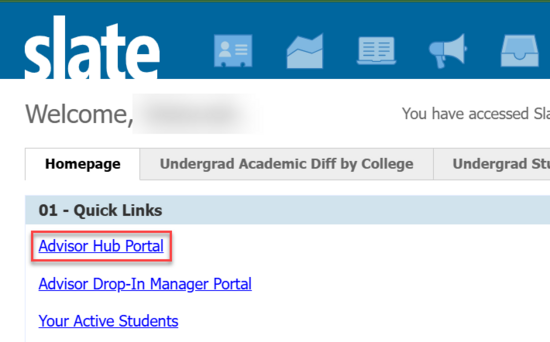
From the Slate homepage, click the top Quick Link called “Advisor Hub Portal” to return to the portal from the back end.
-
I've added a profile picture to the Advisors folder in the Deliver Library and named it using the NetID.jpg format. Is there anything else I need to do?
You’re all set! It usually takes a few hours for your profile picture to show on your “My Info” tab, but as long as you named the file correctly, it will be displayed.
-
Is it possible to request updates to the Slate Student Success Platform?
Yes. Simply submit a ServiceNow ticket to request your desired updates. Please note that update requests are subject to the review of the committee governing Slate. Approvals will depend on several factors such as the impact of the change on other Slate users, the amount of resources needed or are available to make the change, etc.
-
How do I provide the student with a reason for canceling an appointment?
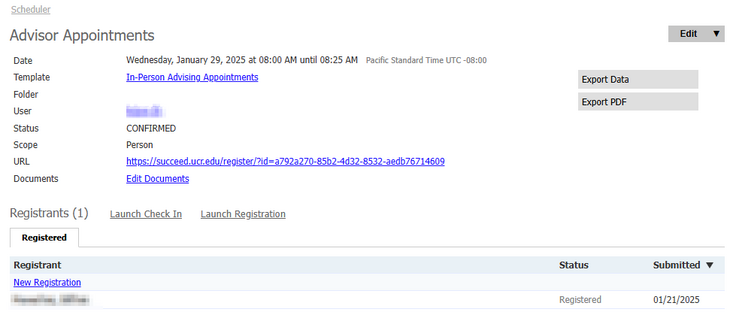
When you click on the “Cancel Appointment” button from the pop-up window of the student’s appointment, you will be redirected to the Session Details. To add a reason for canceling the appointment, first click on the student’s name towards the bottom of the screen:
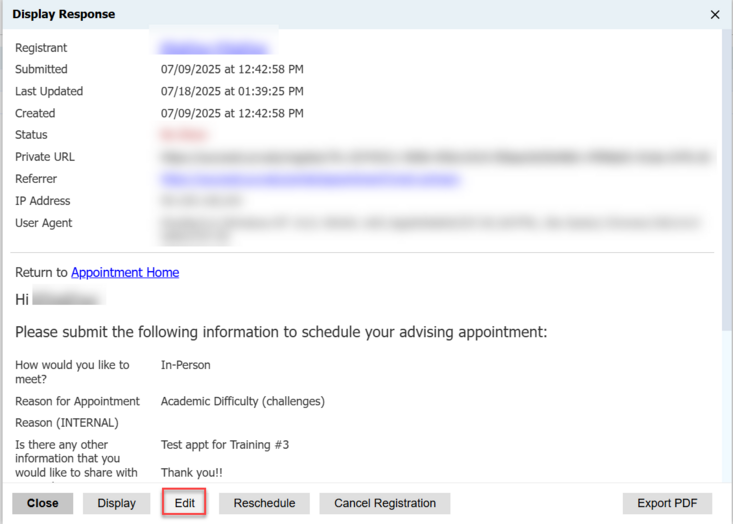
Next, select "Edit":
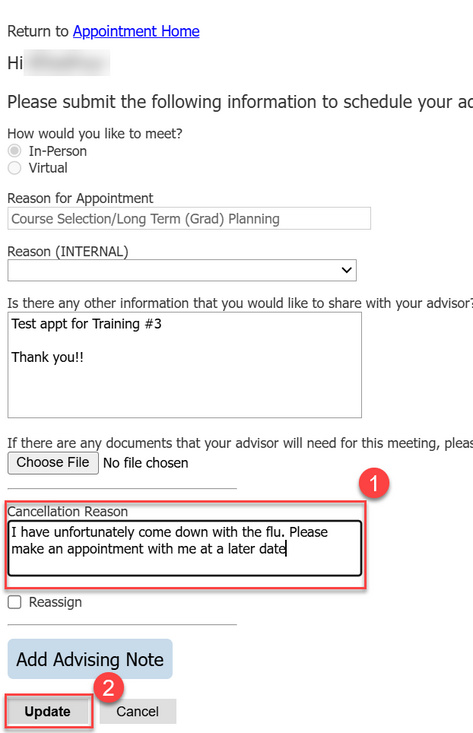
On the next screen, under “Cancellation Reason,” input the reason for canceling the appointment. Note that you will also receive a copy of the information you put in this section.
After you input the cancellation reason, click “Update”:
You will be redirected to the Session Details page. Select the student’s name again, then click “Cancel Registration”:
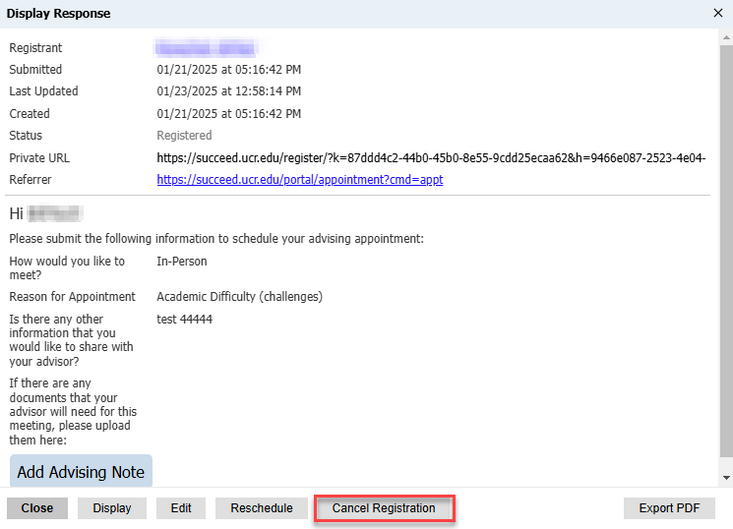
The information you entered in the “Cancellation Reason” text box will be copied into the email that the student receives when an appointment is canceled.
-
Can I see another advisor’s availability in Slate?
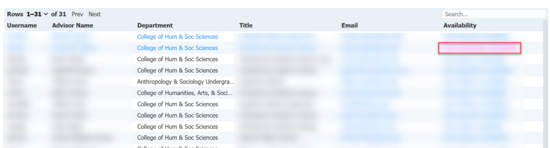
Yes, there is a query built for this. Access the View Advisor Availability query and from there you may “Copy” the query (if you would like to modify it) or “Run” the query. The “Advising Office” filter is pinned to make it easier to specify which school/college/unit you would like to view. Once the query has been run, click the “View [person]’s Availability” link on the far right column:
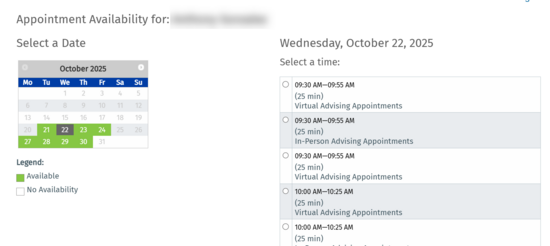
You will be brought to a page displaying the advisor’s availability as it displays for students when they are trying to make an appointment:
-
I’ve noticed that when I access the Student Profile from the link in Slate it ties the profile to the current quarter or the student’s most recent active quarter. I often need to access information from other quarters. Is there a way to do this?
Yes, although this is technically not something specific to Slate Student Success. When you look at the URL in your browser while you are in Student Profile, you will notice that it specifies the quarter you are currently viewing (see sample screenshot below). If you change the highlighted part of the URL to reflect the quarter you want to access and press the “Enter” (or “Return”) key, your view will be updated to the correct quarter.

FREQUENTLY ASKED QUESTIONS FOR STUDENTS
-
I have a major in one school/college and would like to declare a double major or a minor in another school/college. How do I make an appointment with an advisor from my other school/college?
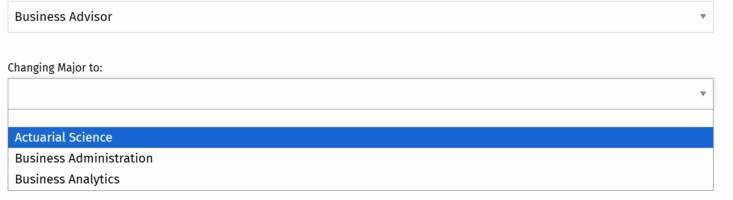
From the “Advising Support” tab of your Slate Student Success portal, select “Degree Planning,” then “Major Change Declaration.” From there, you’ll need to select the school or college that houses your desired major or minor:
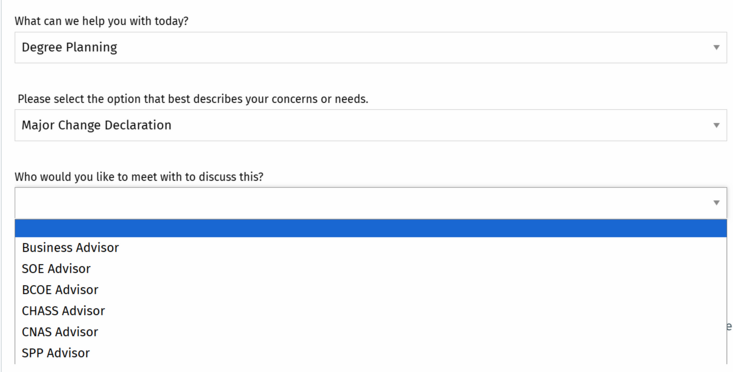
Once you have selected the appropriate school/college, choose the major or minor that you are considering declaring. Then click “Submit.”
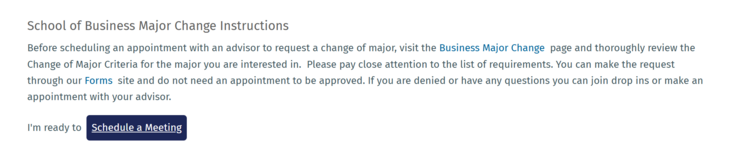
On the next screen, you’ll be given information about the Change of Major process of that school/college (note that this information can differ for each school or college) and a button to “Schedule a Meeting” will appear.
Training and Resources
Training Documentation
Using Slate for the first time? Check out the documentation below to get started with the Slate Student Success Platform as an advisor or a student.
-
The Slate Student Success Portal (For Students)
The primary purpose of the Slate Student Success Portal is to allow students to make advising appointments. The portal lets students schedule future appointments as well as same-day drop- in sessions. Additionally, the portal can be used as an access point to other campus resources, such as degree audit, financial aid, and the academic calendar.
Navigate the Slate Student Success Portal: https://goto.ucr.edu/slate-student-portal
Access the Slate Student Success Portal: https://succeed.ucr.edu/portal/studentsuccess -
The Slate Advisor Portal (For Advisors)
In this portal, advisors can manage their appointments and schedules and access student information.
Navigate the Slate Advisor Portal: https://goto.ucr.edu/slate-advisor-portal
Access the Slate Advisor Portal: https://succeed.ucr.edu/portal/advisor_hub -
The Slate Drop-In Management Portal (For Advisors)
This portal is used by advising staff to manage unscheduled sessions requested by students via the Slate Student Success Portal. It has multiple drop-in rooms so that each school/college can manage appointments and availability via one or more drop-in rooms.
Navigate the Slate Drop-In Management Portal: https://goto.ucr.edu/slate-drop-in-portal
Access the Slate Drop-In Management Portal: https://succeed.ucr.edu/portal/advisor_dropin_manager -
Learn More About Slate’s Features (For Advisors)
The Slate application has many helpful features, including the ability to create queries and reports, send out mailings, and set up forms and events.
Additional information about these features can be found in the Slate Knowledge base article: https://goto.ucr.edu/slate-kb
Note: If a “Knowledge record not found” message is received, select the “Log In” option found in the main page navigation and sign in with your UCR credentials to view the article.